Winbox for Android Pro2.0
Publisher Description
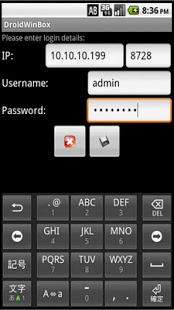
This is a simple Router OS management application that strives to replicate the features of the Winbox application that comes with Router OS devices.
Please note that it connects to the API port. API uses port 8728 and is disabled by default. To enable API use the following command in the terminal:
/ip service enable api
Current Features:
* Save/Edit login credentials for multiple routers
* Import .WBX Files from official windows version
* See interface list, traffic
* Enable / Disable Interfaces
* See Wireless Interface Details, CCQ, Rates, MAC, Settings
* Scan for Wireless Networks
* Add/Remove/Edit IP
* Display IPv4 Routes
* Reboot Router
* File Manager (List, Delete)
* Backup RB
* DNS - View settings, cache, static
* Firewall - Display settings, edit some basic NAT stuff
* Display System Log
* Hotspot view all settings etc (PRO ONLY)
* Scripts Edit and Run (PRO ONLY)
This version gets priority support and all new dev requests on this version will be developed before any free version requests.
About Winbox for Android Pro
The company that develops Winbox for Android Pro is Wolfen351. The latest version released by its developer is 2.0. This app was rated by 1 users of our site and has an average rating of 5.0.
To install Winbox for Android Pro on your Android device, just click the green Continue To App button above to start the installation process. The app is listed on our website since 2013-04-17 and was downloaded 2,022 times. We have already checked if the download link is safe, however for your own protection we recommend that you scan the downloaded app with your antivirus. Your antivirus may detect the Winbox for Android Pro as malware as malware if the download link to wolfen.DroidWinBoxPro is broken.
How to install Winbox for Android Pro on your Android device:
- Click on the Continue To App button on our website. This will redirect you to Google Play.
- Once the Winbox for Android Pro is shown in the Google Play listing of your Android device, you can start its download and installation. Tap on the Install button located below the search bar and to the right of the app icon.
- A pop-up window with the permissions required by Winbox for Android Pro will be shown. Click on Accept to continue the process.
- Winbox for Android Pro will be downloaded onto your device, displaying a progress. Once the download completes, the installation will start and you'll get a notification after the installation is finished.
Program Details
System requirements
Download information
Pricing
Version History
version 2.0
posted on 2013-04-17
Several fixes and updates
version 2.0
posted on 2013-04-17
Version 2.0,Major Upgrade,Released early for pro users, to say thanks!,* Edit Routes,* Login process improved,* Simple alignment tool added,* Netwatch support,* 1000+ RB support,* Font size adjustable,* Torch on interfaces,* Edit DNS settings,* Winbox Style comments in tables,* Special column with Dynamic Static Running etc,* Routers numbered
